

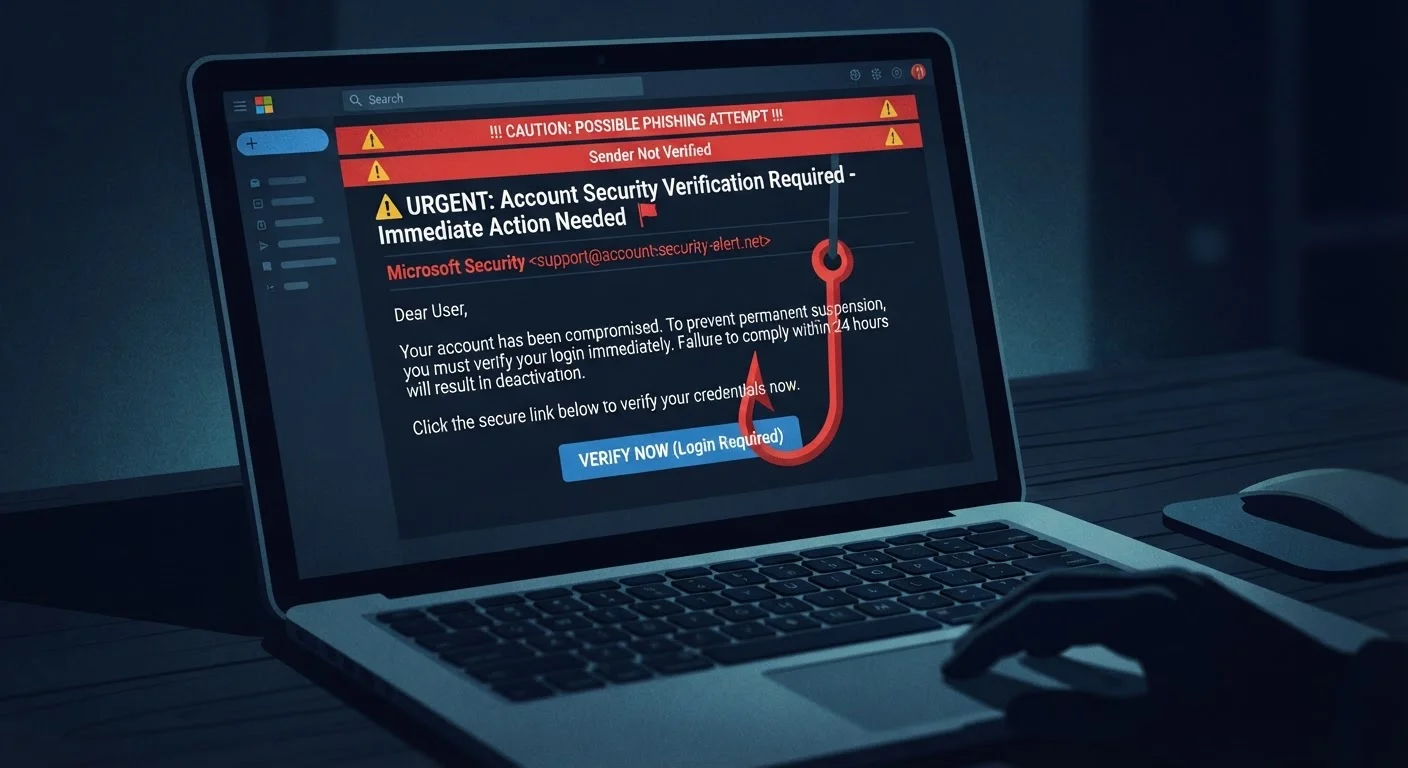
Why Phishing Emails Work on Smart People
Phishing isn't a technology problem — it's a psychology problem. Scammers don't need to hack your computer if they can hack your judgment instead. These emails are carefully engineered to trigger instinctive emotional responses that short-circuit your critical thinking.
The most common trigger is urgency. Subject lines like "Your account will be suspended in 24 hours" or "Immediate action required" are designed to make you act before you think. Fear of losing access to a bank account or having a package delayed is a powerful motivator — and scammers know it.
A secondary tactic is authority. Emails that appear to come from the IRS, your bank, or a major retailer carry built-in credibility. People are conditioned to respond to institutions they trust, and phishers exploit that conditioning deliberately.
“Phishing attacks succeed not because users are foolish, but because the attacks are well-crafted and exploit cognitive shortcuts that all humans rely on every day.”
— Ciaran Martin, Former CEO, UK National Cyber Security Centre
The Telltale Signs Hidden in Plain Sight
Even the most convincing phishing emails leave clues. Once you know what to look for, many become obvious.
- Mismatched sender address: The display name may say "PayPal Support" but the actual email address is something like support@paypa1-secure.net. Always check the full address, not just the name.
- Generic greetings: Real companies that have your account almost always address you by name. "Dear Valued Customer" is a warning sign.
- Suspicious links: Hover your cursor over any link before clicking — the destination URL will appear in your browser's status bar. If it doesn't match the claimed sender's domain, don't click.
- Requests for sensitive information: Legitimate banks, government agencies, and reputable companies do not ask you to verify your password, Social Security number, or full card details via email.
- Grammar and formatting oddities: While many modern phishing emails are polished, inconsistent fonts, awkward phrasing, or strange punctuation can still betray a scam.
The Two-Second Pause That Protects You
Before clicking any link in an email, pause and ask: Was I expecting this message? Does the sender address exactly match the organization's real domain? When in doubt, navigate to the website directly through your browser rather than following the email's link. This one habit eliminates the majority of phishing risk.
Understanding these signals is part of a broader digital literacy — just as it's worth knowing common internet terms to navigate the web more safely.
What Scammers Want — and What They Do With It
Phishing attacks typically aim for one of two outcomes: your credentials or your click. A fake login page harvests your username and password, which can then be used to access your real accounts or sold on the dark web. A malicious link can silently install software that monitors your keystrokes or locks your files for ransom.
3.4 billion
Phishing emails sent daily worldwide
According to cybersecurity research cited by AAG IT Support, an estimated 3.4 billion spam and phishing emails are sent every day globally.
36%
Share of data breaches involving phishing
Verizon's Data Breach Investigations Report has consistently found phishing to be among the leading causes of confirmed data breaches across industries.
1 in 5
Employees who click phishing links in tests
Security awareness training firm data suggests roughly one in five employees clicks a link in simulated phishing tests, underscoring how effective these attacks remain.
Weak or reused passwords make credential theft significantly more damaging. If the same password protects your email and your bank account, a single successful phish can cascade into a much larger breach. Our related explainer on why common passwords fail explains what makes credentials vulnerable and how to strengthen them.
In some cases, the goal is financial fraud directly — a fake invoice, a spoofed wire transfer request, or a fake charity appeal. The language used in these emails often mimics the exact tone of the institution being impersonated, right down to logo placement and footer disclaimers.
How to Respond When Something Feels Off
Your instincts matter. If an email feels slightly wrong — even if you can't pinpoint why — treat that feeling as data.
The safest response to a suspicious email is to not interact with it at all. Don't click links, don't download attachments, and don't reply. Instead, go directly to the organization's official website by typing the address yourself, or call them using a phone number from their official site — not one provided in the email.
Two-Factor Authentication Adds a Safety Net
Even if a phishing attack successfully captures your password, two-factor authentication (2FA) can prevent a scammer from accessing your account. With 2FA enabled, logging in requires a second verification step — usually a code sent to your phone — that the attacker won't have. Enable it wherever accounts allow, especially for email, banking, and social media.
It's also worth noting that the same manipulative language patterns used in phishing aren't unique to cybercrime. Persuasion techniques that exploit trust and urgency show up in many contexts — including, as explored in our piece on how marketing language shapes consumer beliefs, everyday product marketing. Recognizing those patterns in any context builds your overall media literacy.
If you believe your credentials have been compromised, change affected passwords immediately, enable two-factor authentication where available, and monitor your financial accounts for unusual activity.
Frequently Asked Questions
Look for urgency-driven language, generic greetings like 'Dear Customer,' and sender addresses that don't match the claimed organization. Hover over any links to check if the URL looks suspicious or unrelated to the sender. When in doubt, go directly to the organization's official website rather than clicking any link in the email.
Clicking a phishing link can expose your device to malware or take you to a fake login page designed to steal your credentials. If you clicked and entered information, change your passwords immediately and monitor your accounts. See our guide on <a href="/tech-gadgets/computers-internet/signs-your-computer-has-malware-and-what-to-do-next">signs your computer may have malware</a> for next steps.
Not anymore. Modern phishing emails can look nearly identical to real communications from banks, retailers, or government agencies. Spear phishing messages may even reference your name or recent activity. Healthy skepticism and verifying through official channels remain your best defenses.
Yes. You can report phishing emails to the FTC at reportfraud.ftc.gov and forward suspicious emails to the Anti-Phishing Working Group at reportphishing@apwg.org. Most email providers also have a built-in 'Report phishing' or 'Report spam' button.
Absolutely. SMS-based phishing is called 'smishing,' and phone call-based phishing is called 'vishing.' The same psychological tactics apply — urgency, impersonation, and pressure to act fast without thinking.
The content on this site is for informational purposes only and is not a substitute for professional advice. Always consult a qualified professional for guidance specific to your situation.