

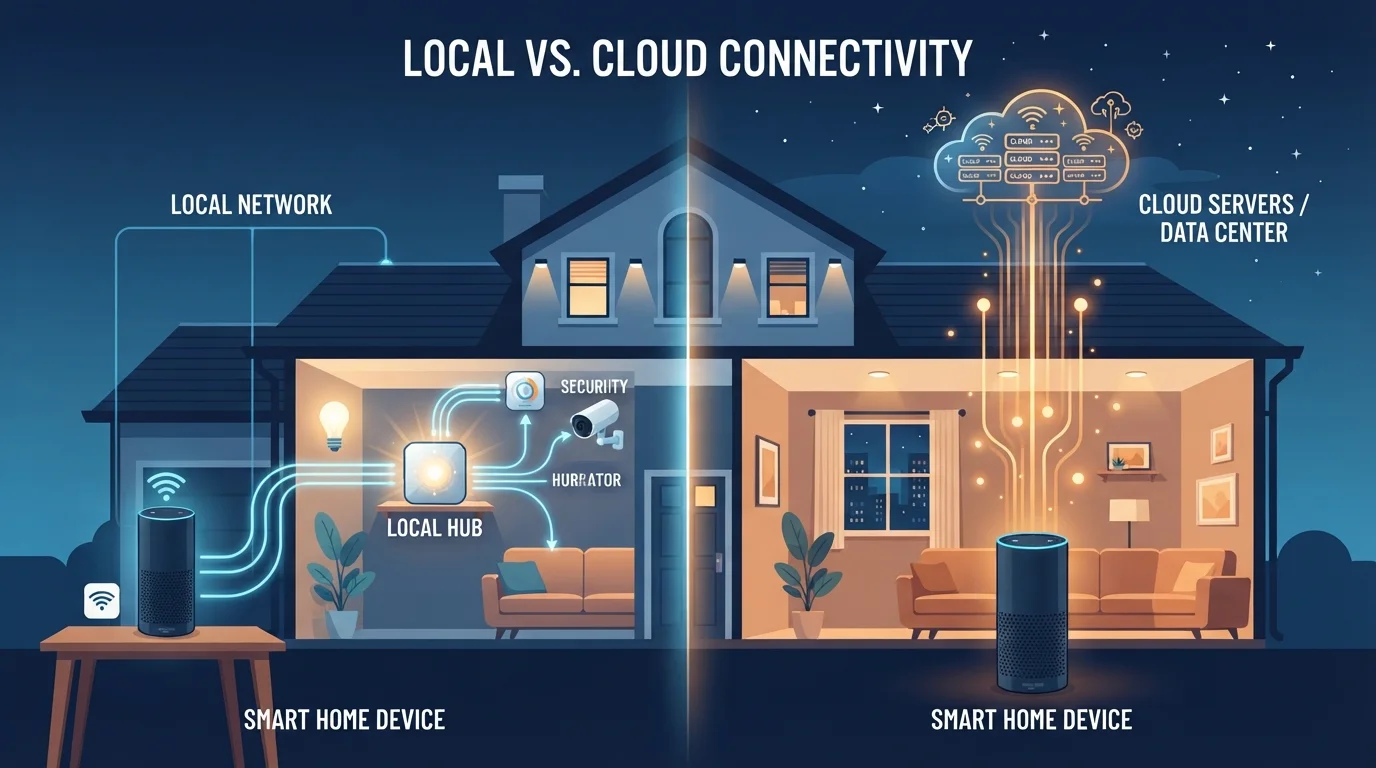
Option A
Local Processing
The self-contained, privacy-forward approach.
Best for: Households that prioritize speed, offline reliability, and keeping data inside the home.
Option B
Cloud Processing
The connected, feature-rich, remotely managed approach.
Best for: Users who want advanced AI features, easy remote access, and automatic software updates.
What These Two Approaches Actually Mean
Every smart home device — whether a thermostat, a doorbell camera, or a voice assistant — has to make sense of your commands and sensor data. The question is: where does that computation happen?
Local processing means the device (or a hub physically in your home) performs the analysis itself, using its own chip and software. No internet connection is required for the core function. Cloud processing means the raw data — your spoken command, a video clip, a motion-trigger event — is sent over the internet to remote servers, processed there, and a response is sent back.
To understand why this matters in practice, it helps to think about the journey your data takes. With a cloud-dependent voice assistant, your words travel from the microphone, through your home router, to a data center potentially thousands of miles away, get interpreted, and an answer returns — all in a fraction of a second under ideal conditions. With a locally processed device, that entire loop happens inside a chip the size of your thumbnail, sitting on your kitchen counter. For a deeper look at what smart home technology involves at a foundational level, see what makes a home truly smart.
| Criterion | Local Processing | Cloud Processing |
|---|---|---|
| Internet required to function | No | Yes |
| Response speed | Near-instant, no network delay | Depends on connection quality |
| Data leaves your home | Minimal to none | Yes, to remote servers |
| AI/voice capability | Limited by on-device hardware | Access to powerful cloud models |
| Works during outages | Yes, core functions continue | Often not, or degraded |
| Remote access from outside home | Requires extra setup | Built in by default |
| Software updates | Manual or scheduled locally | Automatic via cloud |
Speed, Reliability, and the Internet Dependency Problem
Response latency — how fast a device reacts — is one of the clearest practical differences. Local processing typically delivers near-instant responses because there's no network round-trip. Cloud processing introduces a dependency on your internet connection's speed, stability, and the server's own load at that moment.
The more significant issue is what happens when your internet goes down. Cloud-dependent devices may become partially or completely non-functional during an outage. A smart lock that requires cloud verification to open is a genuine inconvenience if your ISP has a problem. Locally processed devices generally continue operating normally — they don't need the internet to do their job.
~150ms
Typical cloud round-trip latency added
Network engineers commonly cite 100–200ms of added latency for a typical cloud processing round-trip on a home broadband connection under normal conditions.
43%
U.S. adults concerned about smart device privacy
A Pew Research Center survey found that roughly four in ten American adults express concern about the data their connected home devices collect.
This distinction becomes especially important for safety- or access-critical devices. Locally processed smart home hubs, like those running open-source platforms such as Home Assistant, are specifically designed around this reliability principle. That said, even locally processed devices often require internet connectivity for firmware updates and remote access features.
Privacy: Where Your Data Goes and Who Can See It
Privacy is arguably the most consequential difference between these two approaches. When a device uses cloud processing, it must transmit data — often including audio snippets, video frames, or detailed usage logs — to servers operated by the manufacturer or a third party. That data may be stored, used to train AI models, or shared under terms outlined in a privacy policy that most users never read in full.
Local processing keeps that data inside your home. A locally processed motion sensor, for example, detects movement and triggers a scene without ever sending that event to an external server. Your patterns of activity stay on your own hardware.
This doesn't mean locally processed devices are automatically private — a device could still log behavior and sync it periodically — but the structural exposure is lower. If this topic concerns you, our article on what data your smart home devices collect and where it goes covers this in detail. Network-level protections also matter regardless of processing type — see securing your smart home network for practical steps.
Hybrid Devices Can Be Hard to Identify
Manufacturers don't always clearly label whether a device processes locally, in the cloud, or both. Checking the product's privacy policy or support documentation for mentions of 'edge processing,' 'on-device AI,' or 'local API' can help clarify how your specific device operates. Community forums for smart home platforms are also a reliable source of this information.
The Reality: Most Devices Use Both
The local vs. cloud framing is useful for understanding trade-offs, but the honest picture is more nuanced. Many devices operate in a hybrid mode: basic commands and safety-critical functions run locally, while advanced features — complex natural language queries, cloud-based routines, remote access — rely on connectivity.
A smart speaker might handle a simple timer locally but send a request for weather data to the cloud. A security camera might analyze motion locally to decide whether to record, but upload clips to cloud storage for review. Understanding which parts of your device operate which way helps you make smarter decisions about placement and backup plans.
If you're building out your setup and weighing how these decisions interact with cost, which smart home categories offer the most practical value is a useful reference. The local-vs-cloud question also parallels storage decisions you may face with your files — cloud storage vs. local storage explores similar trade-offs in that context.
The content on this site is for informational purposes only and is not a substitute for professional advice. Always consult a qualified professional for guidance specific to your situation.