

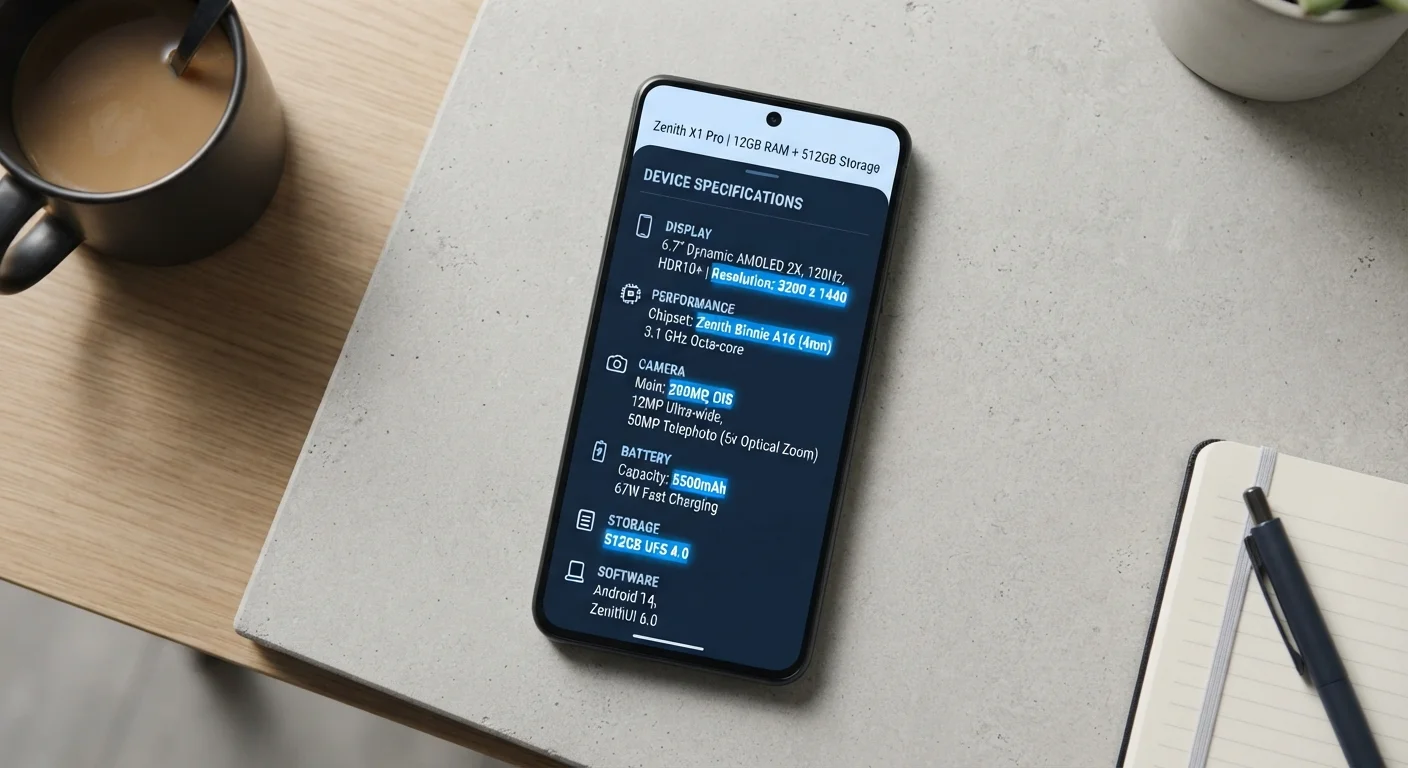
Why Smartphone Specs Feel So Confusing
Every smartphone listing comes packed with abbreviations, gigabytes, gigahertz, and refresh rate numbers that can feel more like a test than a shopping aid. But each figure on a spec sheet answers a specific, practical question about how a phone will perform in daily life. Understanding even a handful of key specs makes it far easier to evaluate a device on its merits rather than relying on marketing language alone.
If you're newer to smartphones altogether, our beginner's introduction to how smartphones work is a useful starting point before diving into specs. For readers who also want to compare how these concepts translate to laptops and desktops, our computer specs guide covers the same triangle from a PC perspective.
RAM
Random Access Memory — the short-term memory a phone uses to run active apps. More RAM allows more apps to stay loaded simultaneously without needing to reload.
Processor (SoC)
The System on a Chip that handles all computing tasks on a smartphone. It determines how fast apps run, how capable the camera is, and how efficiently the phone uses power.
Refresh Rate (Hz)
How many times per second the phone's display redraws the image. Higher rates (90 Hz, 120 Hz) produce smoother scrolling and animations but can use more battery.
Storage (GB/TB)
The permanent capacity for apps, photos, and files on a device. Unlike RAM, storage retains its contents when the phone is powered off.
mAh (milliamp hours)
The unit used to measure battery capacity. A higher mAh rating generally indicates a larger battery, though real-world life also depends on software efficiency and screen size.
Clock Speed (GHz)
A measure of how many processing cycles a chip completes per second. Higher GHz can indicate faster performance, but chip architecture and generation also heavily influence real-world speed.
RAM, Processor, and Refresh Rate — Defined
Three specs come up in nearly every phone comparison, and they each answer a distinct question about everyday use.
| Typical RAM for everyday use | 6–8 GB |
| Standard display refresh rate | 60 Hz |
| High-refresh-rate displays | 90 Hz or 120 Hz |
| Common entry-level storage | 64–128 GB |
| Processor measurement unit | GHz (gigahertz) |
RAM: How Much Can Your Phone Handle at Once?
RAM (Random Access Memory) is your phone's short-term working memory — it holds the apps and data that are actively in use. A phone with more RAM can keep more apps loaded in the background, meaning you switch between them faster without waiting for them to reload. Most everyday users find 6–8 GB of RAM sufficient for multitasking, social media, and streaming. Heavy users running demanding apps or games may benefit from more.
The Processor: Your Phone's Engine
The processor (also called a chipset or SoC — System on a Chip) handles every computation the phone makes. Processor performance affects how quickly apps open, how smoothly video plays, and how capable the camera software is. Clock speed (measured in GHz) and the number of cores both contribute to performance, but manufacturers also optimize their chips differently, so raw numbers alone don't tell the full story. A newer-generation chip with a lower clock speed can outperform an older, faster-clocked one.
Refresh Rate: How Smooth Does the Screen Look?
Refresh rate, measured in Hz (hertz), is how many times per second the display updates the image. A 60 Hz screen refreshes 60 times per second — the long-standing standard. A 90 Hz or 120 Hz screen feels noticeably smoother when scrolling or playing games. The tradeoff is battery life: higher refresh rates draw more power, though many phones now use adaptive refresh rates that scale down automatically when the extra smoothness isn't needed.
Storage, Battery, and Connectivity: The Supporting Cast
Beyond the headline three, a few more specs consistently affect day-to-day experience.
120 Hz
Refresh rate of many flagship displays
High-refresh-rate screens have become standard on premium smartphones, with some models supporting adaptive rates that drop to 1 Hz when idle to conserve power.
6–8 GB
RAM common in mid-range phones
Mid-range smartphones have grown significantly in RAM capacity over the past several years, closing the gap with premium flagships for everyday multitasking tasks.
5,000 mAh
Typical large-battery capacity
Many current smartphones ship with batteries in the 4,500–5,000 mAh range, a significant increase from the 3,000 mAh cells common in earlier generations.
Storage (measured in GB or TB) is how much content — apps, photos, videos, files — the phone can hold permanently. Unlike RAM, storage doesn't speed up your phone directly, but running low on it can cause sluggishness on some devices. Cloud backups can offset limited storage, but local capacity still matters for offline use.
Battery capacity is listed in mAh (milliamp hours). Higher mAh generally means longer battery life, but software efficiency and screen size also play a large role. A phone with a large battery and an optimized operating system can outlast one with a nominally bigger battery running less efficient software. For tips on preserving battery health over time, see our smartphone maintenance guide.
Connectivity specs — including Wi-Fi standards (such as Wi-Fi 6) and cellular bands (4G LTE vs. 5G) — describe how the phone connects to networks. If you're curious about how those network speed numbers translate into real-world performance, our internet speed explainer breaks it down clearly.
Specs Can't Tell You Everything
Manufacturers optimize their hardware and software together, meaning two phones with identical specs on paper can perform differently in real use. It's worth looking at independent benchmark tests and real-world usage reviews alongside raw spec comparisons. Specs are a starting point for evaluation, not a definitive verdict.
How to Use Specs as a Decision Tool
A spec sheet is most useful when you match it to your actual usage patterns. Someone who primarily calls, texts, and uses navigation needs far less RAM and processing power than someone who edits videos or plays graphics-intensive games. Consider which specs directly correspond to the things you do most on your phone, and treat the others as context rather than requirements.
Keep in mind that software support matters just as much as hardware specs. A phone with impressive numbers but a short update lifespan may not serve you as well over time. Our guide to smartphone OS updates explains how long manufacturers typically support their devices and what that means for your phone's longevity. Similarly, the operating system itself shapes how those specs are put to work — understanding the differences between Android and iOS can clarify which platform uses hardware more efficiently for your needs.
Ultimately, specs describe potential — real-world performance depends on how well the software, hardware, and your usage habits align.
The content on this site is for informational purposes only and is not a substitute for professional advice. Always consult a qualified professional for guidance specific to your situation.